
See Full AIQ Documentation HERE
Overview: Follow this guide to install a popup signup form (powered by Alpine IQ) onto your CannaPlanners website. This popup allows visitors to easily sign up for your SMS/email list without navigating to a separate page.
Step 1: Access the Signup Form in AIQ
Log in to your AIQ (Alpine IQ) dashboard.
Go to Customers > Signup Forms.
Hover over the signup form you want to use.
On the far right, click the More (...) menu, then choose Share Form.
? You can also access this option from inside the form’s detail page.
Step 2: Copy the Tracking Pixel Code
In the Share Form slide-out panel, locate the Tracking Pixel Code.
Use the store dropdown to select the specific store if needed.
Copy the entire code snippet provided.
Step 3: Add the Code to Your Website’s Header
To enable the popup:
For CannaPlanners Sites (WordPress with Lifted Page Builder):
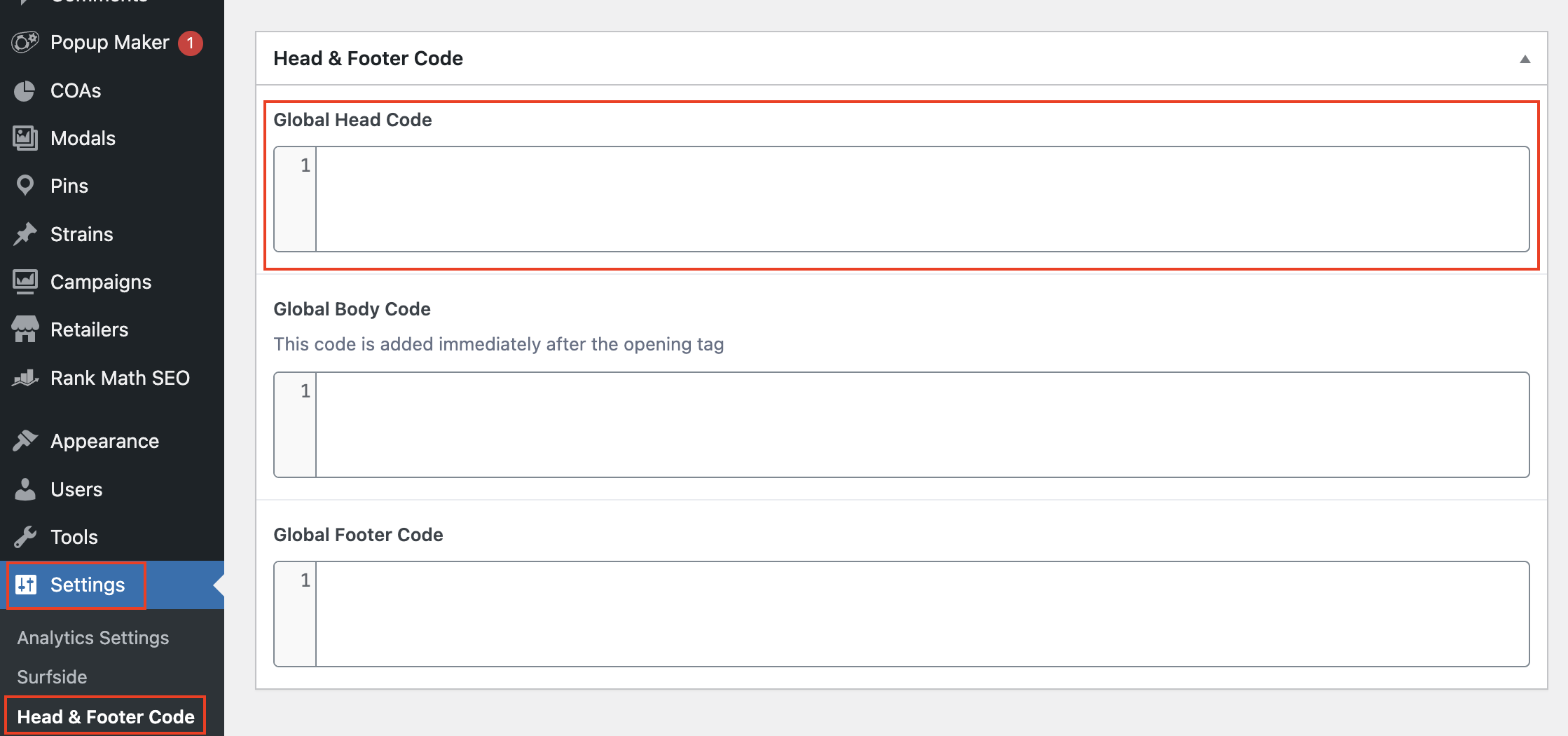
Log into WordPress then paste the code into your Settings > Header & Footer Code > Global Head Code and hit Update in the publish box.
Need help installing the code? Contact our support team at support@cannaplanners.com and we’ll get you set up. Please make sure to email us the header code and the URL to your website.