---
title: Page Creation
description: "Walkthrough Video: HERE Objective This video outlines the steps to effectively create and edit pages using the page builder, ensuring team members can..."
---
[Skip to content](https://helpdesk.cannaplanners.com/learn/website-training-videos/page-creation#main-content)
English
Show submenu for translations
[More support](https://helpdesk.cannaplanners.com/learn/kb-tickets/new?hsLang=en) [Customer portal](https://helpdesk.cannaplanners.com/tickets-view?hsLang=en)

Open main navigation
Close main navigation
- English
Show submenu for translations
- [More support](https://helpdesk.cannaplanners.com/learn/kb-tickets/new)
- [Customer portal](https://helpdesk.cannaplanners.com/tickets-view)
- [Submit a Ticket](https://3ch77.share.hsforms.com/27H4imqj2RDSUWYeE9mWSDA)
[Submit a Ticket](https://3ch77.share.hsforms.com/27H4imqj2RDSUWYeE9mWSDA)
How can we help you?
- There are no suggestions because the search field is empty.
1. [CannaPlanners Knowledge Base](https://helpdesk.cannaplanners.com/learn?hsLang=en)
2. [Website Training Videos](https://helpdesk.cannaplanners.com/learn/website-training-videos?hsLang=en)
# Page Creation
**Walkthrough Video:** [HERE](https://www.loom.com/share/b365762deffc4d92bdeb6d8beba0cc7e?sid=2c56ae94-7cfc-4a7c-bf92-e898af21b6e2)
### Objective
This video outlines the steps to effectively create and edit pages using the page builder, ensuring team members can navigate and utilize the available modules efficiently.
**Resources**
- CannaPlanners Demo Site (with Dutchie Menu) [HERE](https://dutchie-demo.cannaplanners.com/)
### Key Steps
Introduction to the Page Builder[0:00](https://loom.com/share/b365762deffc4d92bdeb6d8beba0cc7e?t=0)

- Welcome to the page builder training.
- Overview of the CannaPlanners demo site and its modules. Link to demo site [HERE](https://dutchie-demo.cannaplanners.com/)
Navigating the Modules[0:43](https://loom.com/share/b365762deffc4d92bdeb6d8beba0cc7e?t=43)

- Click on modules or individual pages to view module options.
- Understand naming conventions and examples of modules.
Editing a Page[1:45](https://loom.com/share/b365762deffc4d92bdeb6d8beba0cc7e?t=105)
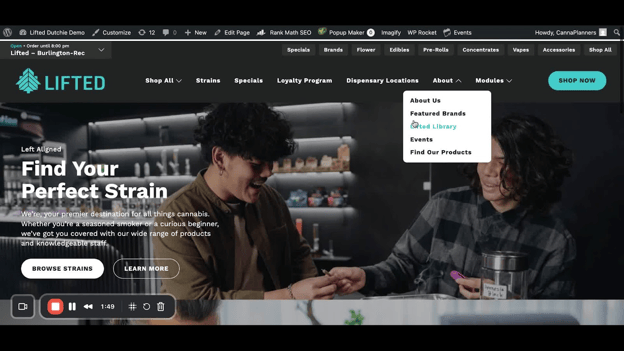
- Log into your site and navigate to the homepage.
- Click 'Edit Page' to access the page builder.
Understanding Modules[2:21](https://loom.com/share/b365762deffc4d92bdeb6d8beba0cc7e?t=141)
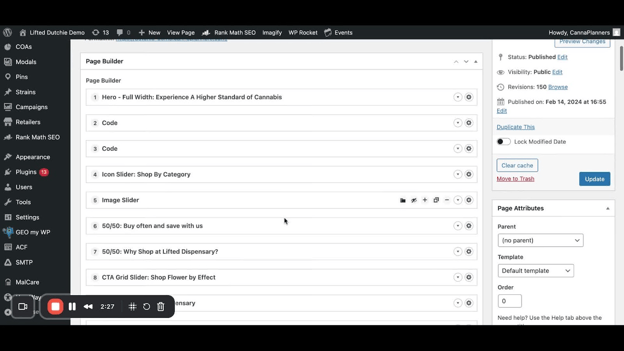
- View all modules listed on the homepage.
- Each module can be edited by clicking the down arrow.
Editing Module Content[2:56](https://loom.com/share/b365762deffc4d92bdeb6d8beba0cc7e?t=176)
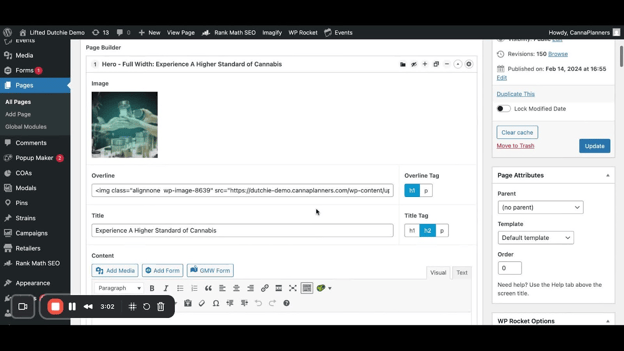
- Edit overline, title, and content within the module.
- Swap out images by removing the current image and adding a new one from the media library.
Module Settings[4:03](https://loom.com/share/b365762deffc4d92bdeb6d8beba0cc7e?t=243)
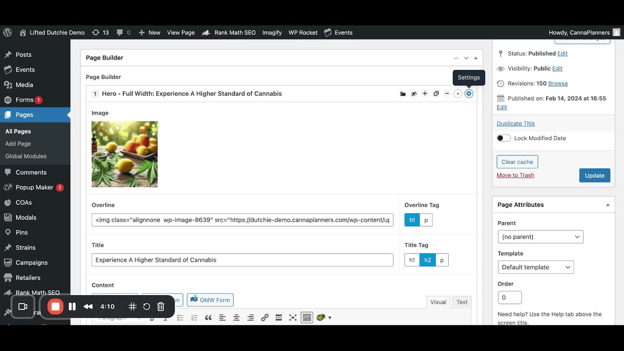
- Access module settings via the gear icon.
- Adjust background color, text color, and alignment options.
Previewing Changes[5:03](https://loom.com/share/b365762deffc4d92bdeb6d8beba0cc7e?t=303)
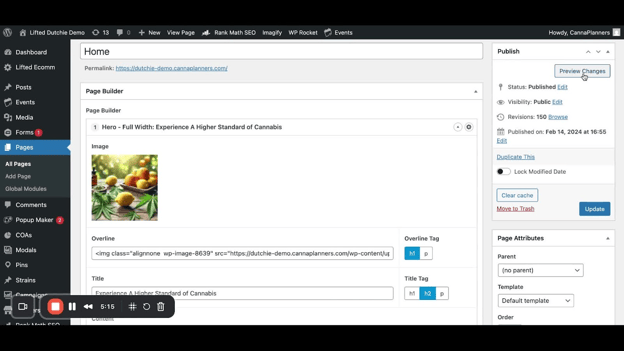
- Use the 'Preview Changes' button to view edits before updating the live site.
Duplicating and Hiding Modules[5:33](https://loom.com/share/b365762deffc4d92bdeb6d8beba0cc7e?t=333)
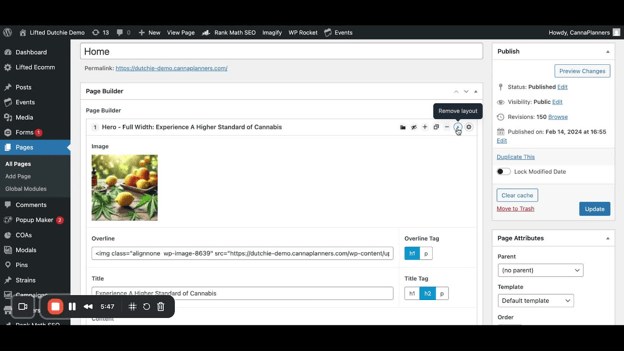
- Duplicate a layout to copy a module with its content.
- Hide a module using the eye icon for content that is not ready.
Copying and Pasting Layouts[6:31](https://loom.com/share/b365762deffc4d92bdeb6d8beba0cc7e?t=391)
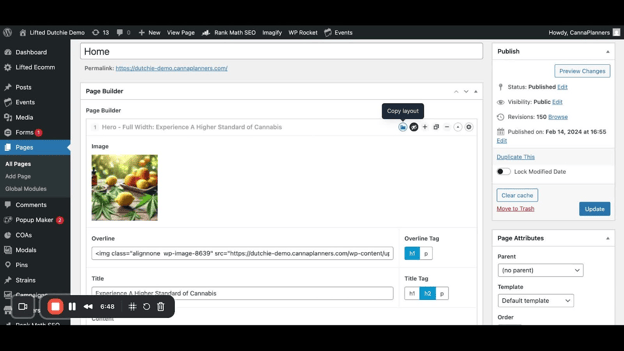
- Use 'Copy Layout' to copy a module's code.
- Navigate to another page and use 'Paste Layout' to insert the copied module.
Adding New Modules[10:26](https://loom.com/share/b365762deffc4d92bdeb6d8beba0cc7e?t=626)
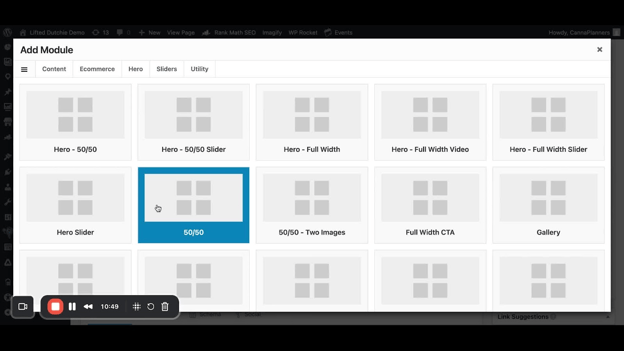
- Click 'Add Module' at the bottom of the page to select new modules.
- Choose the appropriate module based on the content you want to create.
Creating a New Page[16:13](https://loom.com/share/b365762deffc4d92bdeb6d8beba0cc7e?t=973)
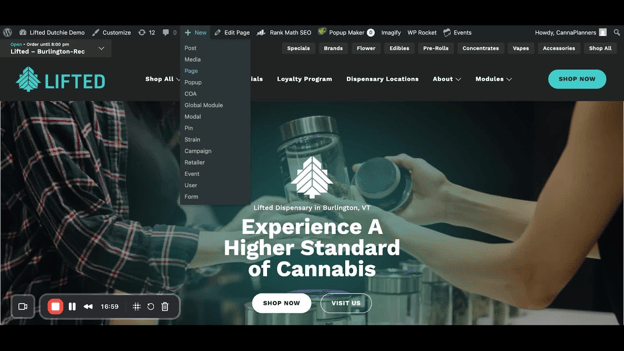
- Click 'Add New Page' to create a draft page.
- Start adding modules and content as needed.
Saving and Publishing Changes[17:35](https://loom.com/share/b365762deffc4d92bdeb6d8beba0cc7e?t=1055)
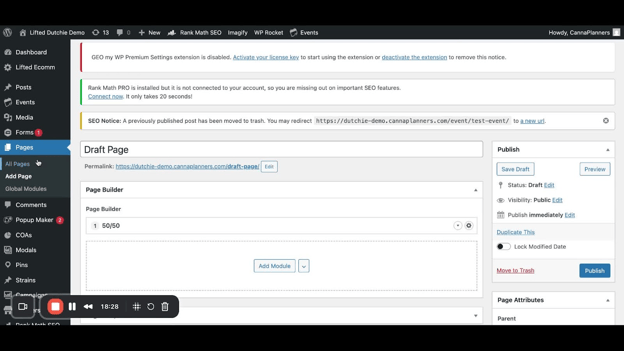
- Save your draft to keep changes without publishing.
- Click 'Publish' to make the page live.
### Cautionary Notes
- Always preview changes before publishing to avoid errors on the live site.
- Ensure that all images and content are appropriate and ready for public viewing before publishing.
### Tips for Efficiency
- Familiarize yourself with the module list to quickly identify which modules to use.
- Use the copy and paste functionality to save time when reusing modules across different pages.
- Regularly save drafts to avoid losing any progress.
### Link to Loom
[https://loom.com/share/b365762deffc4d92bdeb6d8beba0cc7e](https://loom.com/share/b365762deffc4d92bdeb6d8beba0cc7e)
- [Website Training Videos](https://helpdesk.cannaplanners.com/learn/website-training-videos?hsLang=en)
- [Getting Started](https://helpdesk.cannaplanners.com/learn/getting-started?hsLang=en)
- [Account, Domain & Troubleshooting](https://helpdesk.cannaplanners.com/learn/account-domain-troubleshooting?hsLang=en)
- [Marketing Integrations](https://helpdesk.cannaplanners.com/learn/marketing-integrations?hsLang=en)
- [Products & Online Ordering](https://helpdesk.cannaplanners.com/learn/products-online-ordering?hsLang=en#main-content)
- [AIQ / Dispense Menu](https://helpdesk.cannaplanners.com/learn/products-online-ordering?hsLang=en#aiq-dispense-menu)
- [WooCommerce Store](https://helpdesk.cannaplanners.com/learn/products-online-ordering?hsLang=en#woocommerce-store)
- [Promotions & Campaigns](https://helpdesk.cannaplanners.com/learn/products-online-ordering?hsLang=en#promotions-campaigns)
- [Dutchie Menu](https://helpdesk.cannaplanners.com/learn/products-online-ordering?hsLang=en#dutchie-menu)
- [Content & Media](https://helpdesk.cannaplanners.com/learn/content-media?hsLang=en)
- [Site Design & Notices](https://helpdesk.cannaplanners.com/learn/site-design-notices?hsLang=en)
- [Compliance & Lab Results](https://helpdesk.cannaplanners.com/learn/compliance-lab-results?hsLang=en)
[](http://cannaplanners.com?hsLang=en)
[mailto:support@cannaplanners.com](mailto:support@cannaplanners.com)
Copyright © 2026, CannaPlanners